- Go to the following directoy by opening File Explorer and choosing the appropriate pathSPSS 28 users:
- This PC>Local Disk (C:)>Program Files>IBM>SPSS Statistics
- SPSS 27 users: This PC>Local Disk (C:)>Program Files>IBM>SPSS>Statistics>27
- SPSS 26 users: This PC>Local Disk (C:)>Program Files>IBM>SPSS>Statistics>26
- If you have SPSS 26, open ‘VC9’ folder
If you have SPSS 27/28, open ‘VC14’ folder - Locate the file called ‘vcredist_x64’
- Right click on it, and choose ‘Run As Administrator’
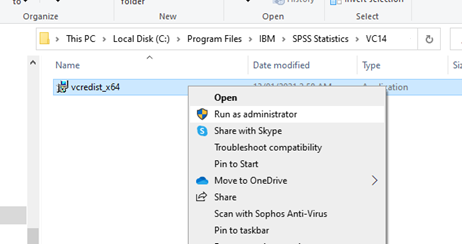
- Follow the instructions to install the libraries (choose "Repair" from the "Maintenance mode" dialog box after the setpup file launches)
- Open SPSS

Free Shiping
From all orders over $100

Free Return Plolicy
Return money within 30 days

Secure Shopping
Youre in safe hands

More Than 1000 Products
We have everything you need
